Samsung Smart TV provides a user experience that differs completely from that of other familiar devices,
such as mobile devices and desktop computers. Users will experience something new while using their TVs.
Samsung Smart TV provides a user experience that differs completely from that of other familiar devices,
such as mobile devices and desktop computers. Users will experience something new while using their TVs.
Samsung Smart TV provides a user experience that differs completely from that of other familiar devices,
such as mobile devices and desktop computers. Users will experience something new while using their TVs.
Samsung Smart TV provides a user experience that differs completely from that of other familiar devices,
such as mobile devices and desktop computers. Users will experience something new while using their TVs.
ARCHIVE
01
ARCHIVE
01
ARCHIVE
01
ARCHIVE
KYUNGHWA JUNG
JENNY
KYUNGHWA JUNG
JENNY
KYUNGHWA JUNG
JENNY
KYUNGHWA JUNG
JENNY
KYUNGHWA JUNG
JENNY
KYUNGHWA JUNG
JENNY
Smart TV Platform
#UX DESIGN #UI DESIGN #SMART TV # TV Set-up
Samsung Smart TV provides a user experience that differs completely from that of other familiar devices,
such as mobile devices and desktop computers. Users will experience something new while using their TVs.
2020

PERIOD
2020
ROLE
Source, Quick settings, Remote interactive guide UI Design
(working with 1 GUI designer)
- Management of updated specifications
- Developing UI guide by seeking ways to improve usability.
- Co-working with GUI, SW and Service for resolving usability issue.
- Response to resolve issues related to quality improvement every quarter
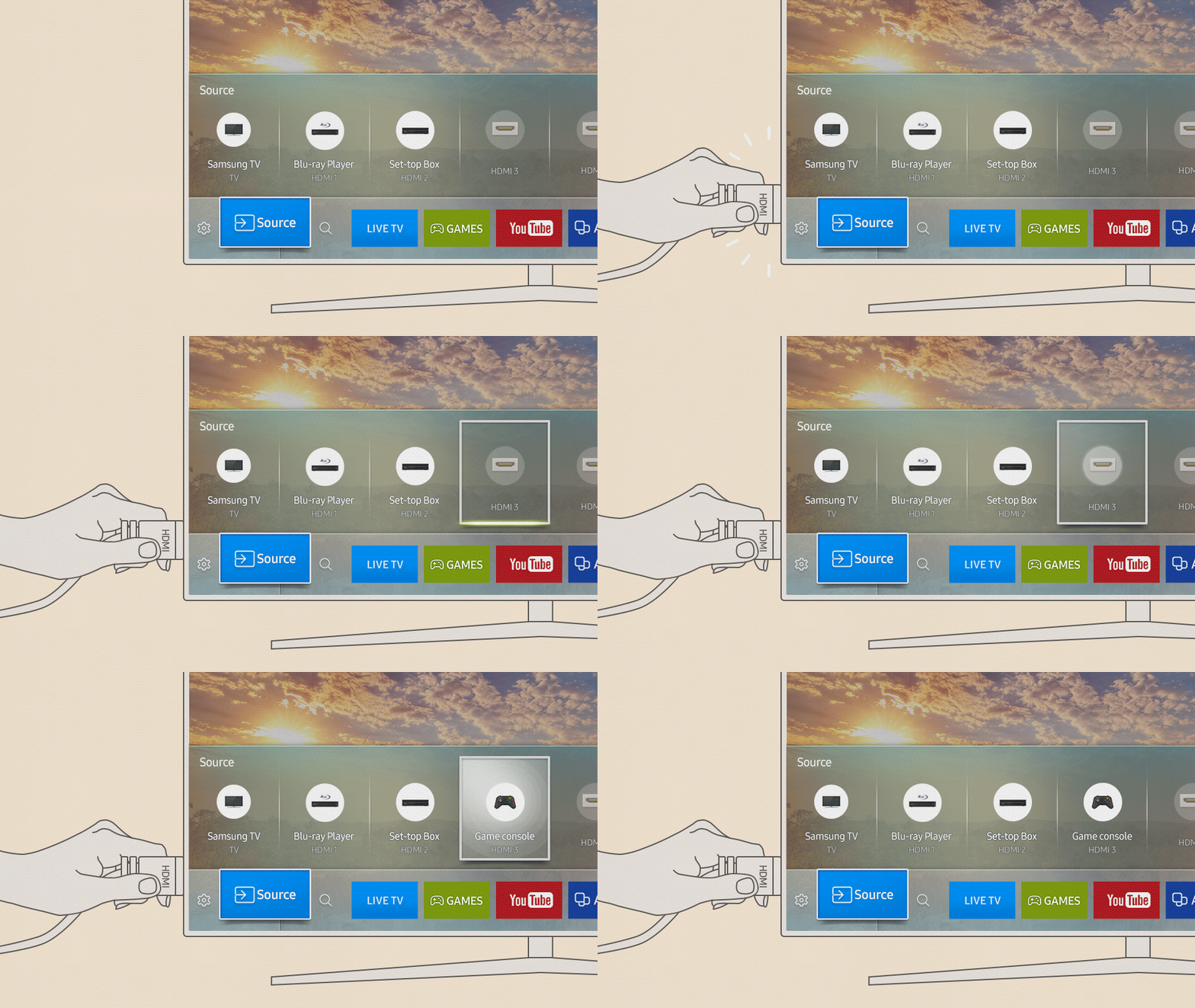
Source
One Remote Control’s auto-detection capabilities take the guesswork out of toggling between devices.
When a device is connected via an HDMI port, the Samsung QLED TV automatically detects the device and lets users know what it is with instantly recognizable icons and names, such as ‘Xbox.’
- by Samsung Newsroom
Responding to the displayed principle of connected devices, usability for steps required for automatic device recognition,
editing functions and etc.
Feature 01.
.png)
Improved usability for issues that occur when various devices are connected.

Feature 02.
Quick Settings
Users may want to adjust the display to liking easily and quickly.
Quick Settings provide representative set-up options that are high usage in the TV.

- Organizing the options that are essential and have high usage proportion in the TV
- Improved usability for screen setting experience.
(Responding to changing setting options annual and considering usability for saving energy related to screening settings.)
- Design of optimizing setting values for each product line up such as Q series, lifestyle and B2B.